
Edison Prep Review: The New TI‑84 Evo Calculator
Date: 5/1/26
By: Brian Eufinger, Edison Prep Co-Founder
Edison Prep Review: The New TI‑84 Evo Calculator
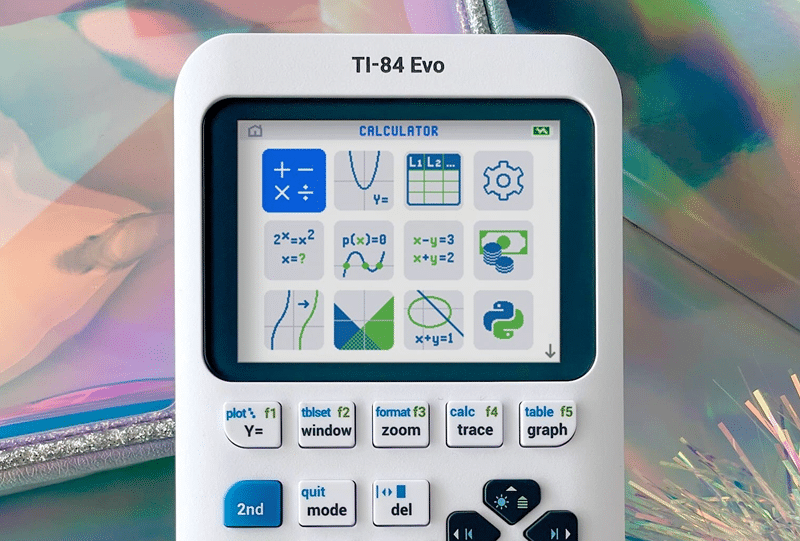
The latest EVOlution of Texas Instruments’ iconic TI-84 graphing calculator has arrived: the TI-84 Evo. If you’re buying your first TI-84, this is the one to get. If you already own a functioning TI-84, upgrading is not necessary.
Overall Verdict: Excellent.
For students entering high school (or earlier), the TI‑84 Evo is a great long-term choice. This is a tool you’ll use for years—through Algebra, Precalculus, Calculus, standardized tests, and often into college.
What’s New (and What Actually Matters)
1) Smarter Home Screen = Faster Access
The redesigned home screen uses intuitive icons to surface features that have technically existed on prior TI-84 models for decades, but were often buried in menus. Speed is key.
Students who don’t practice extensively to learn the user interface (or haven’t gone through structured calculator training like our Edison Prep curriculum) often miss these tools during the test. The Evo reduces that friction and makes key functions easier to find under pressure on SAT/ACT game day.
2) A Real Graphing Upgrade
Graphing is where the Evo clearly pulls ahead:
- ~50% more graphing space
- Sharper, smoother visuals
- Automatic labeling of “points of interest” (zeros, maxima, minima, intersections)
Students who become well versed with the 2nd → TRACE (CALC) menu will love how the Evo makes the results more visible and intuitive. That’s a time-saver and a confidence booster during exams like the SAT and ACT.
3) Imitation: The highest form of flattery
The new home screen interface is clearly a shot across the bow of newer entrants like NumWorks calculator that had been making tiny inroads into some high schools.
While alternatives have introduced cleaner designs, Texas Instruments still dominates the classroom ecosystem. The Evo blends a prettier UI with the familiarity teachers, students and tutors expect.
4) Conics: Much Easier to Work With
This is a quiet but important upgrade:
- You can now graph multiple conics at once. If the ACT keeps adding harder and multiple simultaneous conics, this change will get magnified.
- Entering conics equations is significantly more intuitive
5) Fraction Entry Made Simple
A dedicated, one-click numerator/denominator button makes fraction input faster and cleaner.
It’s a small feature, but one that reduces errors and saves time, especially on multi-step problems. And tutors have a harder time than parents would expect getting students to learn and utilize the existing two-step method.
6) Improved Logarithm Handling
The log button now prompts for a base directly. It is no longer locked into base 10.
- If no base entered → defaults to base 10
- Non-base 10 equations can be input directly
Many students never learn to use the LogBASE function that has long been buried in the Math menu. This brings it to the forefront and removes all possible confusion!
7) Minimal Learning Curve
The learning curve is literally 30 seconds.
- Want to return to the main icon-based home screen? Just press the ON button.
- 95% of functionality mirrors previous TI-84 models
Students used to prior TI-84 models can transition in seconds, not hours.
8) Uses USB-C for charging, not USB Mini-B!
Finding a USB-C cable is easy. Finding a USB Mini-B in a pinch is really hard.
9) The Reality of the Calculator Market
It’s true that some Casio graphing calculators models have offered similar features for years. But that’s not the deciding factor.
Texas Instruments still holds an overwhelming 80-90%+ share of the K–12 graphing calculator market. Teachers design lessons around TI calculators. Classrooms stock them. Tutors teach them. These recent upgrades to the Evo listed above basically neutralize and evaporate most negligible advantages Casio or Numworks calculators might have had.
Final Recommendation
- New buyer? Get the TI‑84 Evo without hesitation.
- Already own a TI-84? Stick with it unless you want the quality-of-life upgrades.
- Multiple siblings? Hand down the old model to the younger sibling and get the elder sibling a TI-84 Evo.
The TI-84 Evo is evolutionary, not revolutionary. It makes powerful tools easier to access. It takes a calculator that was already the clear best of breed and just runs up the scoreboard even further by enhancing usability, speed, clarity, and accessibility. And for students struggling with timing constraints on high-stakes SAT/ACT exams, those small edges add up.
See below for an annotated description of the 14 items on the new Evo Home Screen!
Annotated TI-84 Evo Home Screen: What Each Icon Actually Does (and What Matters for the SAT/ACT)
To make this more useful, we’ve mapped the 12 primary icons (reading left → right, top → bottom across the 3 rows) and added quick, real-world guidance—especially for ACT/SAT students. The fourth row is just two unimportant items and is not shown. 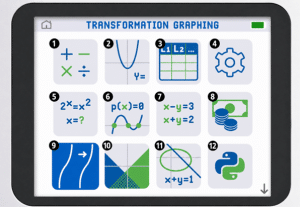
Legend:
- Green + Bold = Easier access to something that already existed on older TI-84s
- Orange + Italics = Not useful for ACT purposes
Row 1
- Calculator: Takes you to the normal calculator screen. Nothing new—just quicker access.
- Y= Editor: Same as the classic Y= button for entering functions to graph.
- List Editor: Rarely useful for ACT students unless probability/statistics becomes significantly more advanced.
- Mode: Same as the MODE button (degree/radian, etc.). Faster access, same function.
Row 2
- Numeric Solver: Same as the Numeric Solver buried in the MATH menu—but now much easier to access. This is a legitimate upgrade for students who are unlikely to master the old TI-84!
- Polynomial Solver: Equivalent to the PlySmlt2 App (Polynomial Solver). Helpful for solving higher-degree equations quickly.
- Equation Solver: Also from the PlySmlt2 App. Direct access makes this more likely to actually get used under time pressure.
- Finance: Potentially useful for college-level finance classes—but irrelevant for SAT/ACT prep.
Row 3
- Transformation Graphing: Tutors may enjoy this, but students risk wasting time. On the ACT, faster manual or standard graphing methods are usually better.
- Inequality Graphing: A cleaner, more intuitive version of the older inequality graphing. Helpful if you’ve practiced it.
- Conics: Same functionality as the Conics app—but with a smoother interface. More students will actually use this effectively now.
- Python: Not useful for standardized tests. Interesting feature, but irrelevant in this context.
- Program: Just takes you to the program menu
- Help: Just takes you to the help menu.