Best practices for Mock SAT and ACT

What’s the right timeline for students to take mock SAT/ACT

How to Take a Virtual Mock ACT

Please familiarize yourself with the information below prior to registering for a Virtual Mock ACT.

Once you have read through the instructions below, you may select your desired test date and time! Follow the prompts to enter your information and complete registration.

Looking for virtual digital Mock SAT testing?
Visit our How to Take a Mock Digital SAT at Home page!

Virtual Mock ACT Instructions:

A downloadable bubble sheet and test packet are available for both versions below!
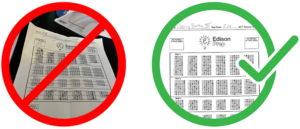
  1. Print the test packet and answer sheet below ahead of time, preferably prior to test day in case there are any printing issues.
  1. Set up a quiet environment where you can focus without distractions like phones, music, pets, or family members and has a flat surface for your mock test, pencils, calculator, and computer screen.
  2. Log in to your Zoom classroom 15 minutes early using the link provided. Once you are in the mock test room, please turn your video on and mute yourself. If you need to ask a question, type it in the chat window at the bottom of the screen. Close all applications other than the Zoom online classroom, especially any that make noise. Complete the mock test following the instructions provided in the zoom meeting.
  3. Email pictures of only your ACT bubble sheet to [email protected] to be graded and analyzed! Be sure to take clear pictures from aboveNOT at an angle!
Edison Prep proctored test results with verified scoring sheets for exam preparation.

How to Join Your Zoom Session

  1. After you click the Zoom link, the “Meeting Registration” page will open up. Verify that you have selected the correct day and time that you would like to attend.
  2. Enter your first name, last name, and email address in the boxes provided, and then click the blue “Register” button.
  3. The next page that pops up says “Meeting Registration Approved” at the top.
  4. You will then either go straight into the class or the class waiting room (if you join 15 minutes or less of the class start time), or if you try to join the class more than 15 minutes before the designated start time, you will get a message that says “Please wait for the Host to start the meeting.” If that happens, then please keep the window open and wait.

NOTE: If you accidentally leave the meeting, to re-join, go to www.zoom.us, click “Join a Meeting” at the top, and enter the 11-digit meeting ID code above.

Please let us know if you have any questions!

Virtual Mock ACT Tests

Dates/times, Details, and Registration
(Eastern Standard Time)

April 2026

  • Sun. Apr. 26, 2026 – 8:30am-11:30am — Mock ACT
    Register for this meeting: Zoom Link

May 2026

  • Sun. May 3, 2026 – 8:30am-11:30am — Mock ACT
    Register for this meeting: Zoom Link
  • Sun. May 10, 2026 – 8:30am-11:30am — Mock ACT
    Register for this meeting: Zoom Link
  • Sun. May 17, 2026 – 8:30am-11:30am — Mock ACT
    Register for this meeting: Zoom Link
  • Sun. May 24, 2026 – 8:30am-11:30am — Mock ACT
    Register for this meeting: Zoom Link
  • Tue. May 26, 2026 – 8:30am-11:30am — Mock ACT
    Register for this meeting: Zoom Link
  • Sun. May 31, 2026 – 8:30am-11:30am — Mock ACT
    Register for this meeting: Zoom Link

June 2026

  • Sun. Jun. 7, 2026 – 8:30am-11:30am — Mock ACT
    Register for this meeting: Zoom Link
  • Sun. Jun. 14, 2026 – 8:30am-11:30am — Mock ACT
    Register for this meeting: Zoom Link
  • Sun. Jun. 21, 2026 – 8:30am-11:30am — Mock ACT
    Register for this meeting: Zoom Link
  • Sun. Jun. 23, 2026 – 8:30am-11:30am — Mock ACT
    Register for this meeting: Zoom Link
  • Sun. Jun. 28, 2026 – 8:30am-11:30am — Mock ACT
    Register for this meeting: Zoom Link

July 2026

  • Sun. Jul. 5, 2026 – 8:30am-11:30am — Mock ACT
    Register for this meeting: Zoom Link
  • Sun. Jul. 12, 2026 – 8:30am-11:30am — Mock ACT
    Register for this meeting: Zoom Link
  • Sun. Jul. 19, 2026 – 8:30am-11:30am — Mock ACT
    Register for this meeting: Zoom Link
  • Sun. Jul. 26, 2026 – 8:30am-11:30am — Mock ACT
    Register for this meeting: Zoom Link

August 2026

  • Sat. Aug. 1, 2026 – 8:30am-11:30am — Mock ACT
    Register for this meeting: Zoom Link
  • Sat. Aug. 1, 2026 – 12:30pm-3:30pm — Mock ACT
    Register for this meeting: Zoom Link
  • Sun. Aug. 2, 2026 – 8:30am-11:30am — Mock ACT
    Register for this meeting: Zoom Link
  • Fri. Aug. 7, 2026 – 8:30am-11:30am — Mock ACT
    Register for this meeting: Zoom Link
  • Sun. Aug. 9, 2026 – 8:30am-11:30am — Mock ACT
    Register for this meeting: Zoom Link
  • Tue. Aug. 11, 2026 – 8:30am-11:30am — Mock ACT
    Register for this meeting: Zoom Link
  • Sun. Aug. 16, 2026 – 8:30am-11:30am — Mock ACT
    Register for this meeting: Zoom Link
  • Sun. Aug. 23, 2026 – 8:30am-11:30am — Mock ACT
    Register for this meeting: Zoom Link
  • Sun. Aug. 23, 2026 – 12:30pm-3:30pm — Mock ACT
    Register for this meeting: Zoom Link
  • Sun. Aug. 30, 2026 – 1:00pm-4:00pm — Mock ACT
    Register for this meeting: Zoom Link

September 2026

  • Sun. Sep. 6, 2026 – 8:30am-11:30am — Mock ACT
    Register for this meeting: Zoom Link
  • Sun. Sep. 13, 2026 – 8:30am-11:30am — Mock ACT
    Register for this meeting: Zoom Link
  • Sun. Sep. 13, 2026 – 12:30pm-3:30pm — Mock ACT
    Register for this meeting: Zoom Link
  • Sun. Sep. 20, 2026 – 8:30am-11:30am — Mock ACT
    Register for this meeting: Zoom Link
  • Sun. Sep. 27, 2026 – 8:30am-11:30am — Mock ACT
    Register for this meeting: Zoom Link

October 2026

  • Sat. Oct. 3, 2026 – 8:30am-11:30am — Mock ACT
    Register for this meeting: Zoom Link
  • Sun. Oct. 4, 2026 – 8:30am-11:30am — Mock ACT
    Register for this meeting: Zoom Link
  • Sun. Oct. 4, 2026 – 12:30pm-3:30pm — Mock ACT
    Register for this meeting: Zoom Link
  • Sun. Oct. 11, 2026 – 8:30am-11:30am — Mock ACT
    Register for this meeting: Zoom Link
  • Sun. Oct. 18, 2026 – 8:30am-11:30am — Mock ACT
    Register for this meeting: Zoom Link
  • Sun. Oct. 18, 2026 – 12:30pm-3:30pm — Mock ACT
    Register for this meeting: Zoom Link
  • Sun. Oct. 25, 2026 – 8:30am-11:30am — Mock ACT
    Register for this meeting: Zoom Link

November 2026

  • Sun. Nov. 1, 2026 – 8:30am-11:30am — Mock ACT
    Register for this meeting: Zoom Link
  • Sun. Nov. 8, 2026 – 8:30am-11:30am — Mock ACT
    Register for this meeting: Zoom Link
  • Sun. Nov. 15, 2026 – 8:30am-11:30am — Mock ACT
    Register for this meeting: Zoom Link
  • Sun. Nov. 15, 2026 – 12:30pm-3:30pm — Mock ACT
    Register for this meeting: Zoom Link
  • Sun. Nov. 22, 2026 – 8:30am-11:30am — Mock ACT
    Register for this meeting: Zoom Link
  • Sun. Nov. 29, 2026 – 8:30am-11:30am — Mock ACT
    Register for this meeting: Zoom Link

December 2026

  • Sun. Dec. 6, 2026 – 8:30am-11:30am — Mock ACT
    Register for this meeting: Zoom Link
  • Sun. Dec. 13, 2026 – 8:30am-11:30am — Mock ACT
    Register for this meeting: Zoom Link
  • Sun. Dec. 20, 2026 – 8:30am-11:30am — Mock ACT
    Register for this meeting: Zoom Link
  • Mon. Dec. 28, 2026 – 8:30am-11:30am — Mock ACT
    Register for this meeting: Zoom Link

January 2027

  • Sat. Jan. 2, 2027 – 8:30am-11:30am — Mock ACT
    Register for this meeting: Zoom Link
  • Sat. Jan. 2, 2027 – 12:30pm-3:30pm — Mock ACT
    Register for this meeting: Zoom Link
  • Sun. Jan. 10, 2027 – 8:30am-11:30am — Mock ACT
    Register for this meeting: Zoom Link
  • Sun. Jan. 17, 2027 – 8:30am-11:30am — Mock ACT
    Register for this meeting: Zoom Link
  • Sun. Jan. 24, 2027 – 8:30am-11:30am — Mock ACT
    Register for this meeting: Zoom Link
  • Sun. Jan. 31, 2027 – 8:30am-11:30am — Mock ACT
    Register for this meeting: Zoom Link
  • Sun. Jan. 31, 2027 – 12:30pm-3:30pm — Mock ACT
    Register for this meeting: Zoom Link

February 2027

  • Sun. Feb. 7, 2027 – 8:30am-11:30am — Mock ACT
    Register for this meeting: Zoom Link
  • Sun. Feb. 14, 2027 – 8:30am-11:30am — Mock ACT
    Register for this meeting: Zoom Link
  • Sun. Feb. 21, 2027 – 8:30am-11:30am — Mock ACT
    Register for this meeting: Zoom Link
  • Sun. Feb. 21, 2027 – 12:30pm-3:30pm — Mock ACT
    Register for this meeting: Zoom Link
  • Sun. Feb. 28, 2027 – 8:30am-11:30am — Mock ACT
    Register for this meeting: Zoom Link

March 2027

  • Sun. Mar. 7, 2027 – 8:30am-11:30am — Mock ACT
    Register for this meeting: Zoom Link
  • Sun. Mar. 14, 2027 – 8:30am-11:30am — Mock ACT
    Register for this meeting: Zoom Link
  • Sun. Mar. 21, 2027 – 8:30am-11:30am — Mock ACT
    Register for this meeting: Zoom Link
  • Sun. Mar. 21, 2027 – 12:30pm-3:30pm — Mock ACT
    Register for this meeting: Zoom Link

April 2027

  • Sun. Apr. 4, 2027 – 8:30am-11:30am — Mock ACT
    Register for this meeting: Zoom Link
  • Sun. Apr. 11, 2027 – 8:30am-11:30am — Mock ACT
    Register for this meeting: Zoom Link
  • Sun. Apr. 18, 2027 – 8:30am-11:30am — Mock ACT
    Register for this meeting: Zoom Link
  • Sun. Apr. 25, 2027 – 8:30am-11:30am — Mock ACT
    Register for this meeting: Zoom Link

May 2027

  • Sun. May 2, 2027 – 8:30am-11:30am — Mock ACT
    Register for this meeting: Zoom Link
  • Sat. May 8, 2027 – 8:30am-11:30am — Mock ACT
    Register for this meeting: Zoom Link
  • Sun. May 16, 2027 – 8:30am-11:30am — Mock ACT
    Register for this meeting: Zoom Link
  • Sun. May 23, 2027 – 8:30am-11:30am — Mock ACT
    Register for this meeting: Zoom Link
  • Sat. May 29, 2027 – 8:30am-11:30am — Mock ACT
    Register for this meeting: Zoom Link

June 2027

  • Sun. Jun. 6, 2027 – 8:30am-11:30am — Mock ACT
    Register for this meeting: Zoom Link
  • Sun. Jun. 13, 2027 – 8:30am-11:30am — Mock ACT
    Register for this meeting: Zoom Link
  • Sat. Jun. 19, 2027 – 8:30am-11:30am — Mock ACT
    Register for this meeting: Zoom Link
  • Sun. Jun. 27, 2027 – 8:30am-11:30am — Mock ACT
    Register for this meeting: Zoom Link

July 2027

  • Mon. Jul. 5, 2027 – 8:30am-11:30am — Mock ACT
    Register for this meeting: Zoom Link
  • Sun. Jul. 11, 2027 – 8:30am-11:30am — Mock ACT
    Register for this meeting: Zoom Link
  • Sun. Jul. 18, 2027 – 8:30am-11:30am — Mock ACT
    Register for this meeting: Zoom Link

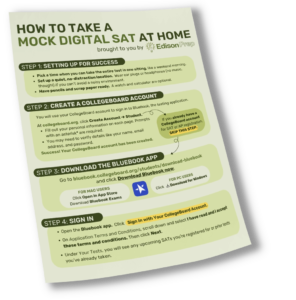
How to Take a Mock Digital SAT at Home

– Anytime, Anywhere –

Practice with a full-length digital SAT experience at home.

Follow these step-by-step instructions to take a mock digital SAT at home. Familiarize yourself with the test format, evaluate your current score, and kickstart your SAT prep plan. Once you’ve completed the test, share your scores with Edison Prep for personalized guidance and support.

Step 1: Set Up For Success

  • Pick a time when you can take the entire test in one sitting, like a weekend morning.
  • Set up a quiet, no-distraction location. Wear earplugs or headphones (no music, though!) if you can’t avoid a noisy environment.
  • Have pencils and scrap paper ready. A watch and calculator are optional.

Step 2: Create a collegeboard account

You will use your College Board Account to sign in to Bluebook, the testing application

At collegeboard.org, click Create Account → Student.

  • Fill out your personal information on each page. Prompts with an asterisk* are required.
  • You may need to verify details like your name, email address, and password.

Success! Your CollegeBoard account has been created.

If you already have a CollegeBoard account for SAT or AP registration, SKIP THIS STEP.

Curved, hand-drawn arrow pointing downward and to the left, conveying emphasis or guiding attention to content in that direction.

Step 3: Download the Bluebook APP

Go to bluebook.collegeboard.org/students/download-bluebook and click Download Bluebook Now.

FOR MAC USERS – Click Open in App Store,  Download Bluebook Exams

FOR PC USERS –  Click Download for Windows

Step 4: Sign In

  • Open the Bluebook app. Click Sign In with Your CollegeBoard Account.
  • On Application Terms and Conditions, scroll down and select I have read and I accept these terms and conditions. Then click Next.
  • Under Your Tests, you will see any upcoming SATs you’re registered for or prior tests you’ve already taken.

Step 5: Take a Full-LenGTh Practice Test

  • Click Full-Length Practice. Select the appropriate Test Type and Practice Test.
    • Click the toggle button under Accommodations and Supports if you will be testing with accommodations on test day.
  • Click Next. Once the app has loaded, you will see a page on Timing, Scores, and Assistive Technology. Read this page carefully before clicking Next to start the test

PRO TIP:

Under Practice and Prepare, click Test Preview to gain familiarity with the Bluebook app before test day.

Step 6: Share Your Scores

  • Once you submit your test, you will see a loading page followed by You’re All Finished! Click View Your Score to be redirected to collegeboard.org.
  • Under My Tests, you will see any tests you have taken.

Don’t forget to email us at [email protected] with your Reading and Writing, Math and Total Scores!

Hand-drawn, scribble-style arrow pointing downward, suggesting direction or emphasis on content below.

You can review all completed Bluebook practice tests—with answer explanations—at mypractice.collegeboard.org/dashboard.

What do I get after the test?

Score report

Detailed analysis

Free expert consultation to discuss your score(s).

Students are encouraged to take both a mock SAT and ACT, or compare their PSAT score to a mock ACT in order to pursue their stronger test!

(Jenna can find images representing those 3 things – report, analysis, and person who looks credible on phone talking to you etc)

Looking for an in person practice test and in the ATL metro area?