How to Access Your Student’s SAT Homework Completion and Progress via the College Board “MyPractice” Dashboard!
– Students are assigned one test each week! –

– Students are assigned one test each week! –
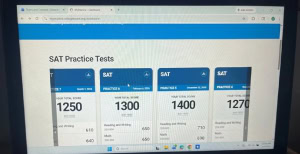
If parents want to check in regarding their student’s SAT practice completion, they should log in to the MyPractice Dashboard where there will be tiles containing all of the student’s completed tests!
Okay, so I logged in! What if my student hasn’t been taking tests?




© Copyright 2010-2026 Edison Prep. All rights reserved. *ACT is a registered trademark of ACT, Inc., SAT and AP are registered trademarks of the College Board, PSAT/NMSQT is a registered trademark of the College Board and National Merit Scholarship Corporation; and none were involved in the production of, or endorses, Edison Prep.
 Mock Test
 Scroll to top